via.placeholder.com/photo
Photo placeholders
Describe what the picture should show, and get a fitting real photo cropped to the size you asked for. The same URL always gives the same photo. Every photo is CC0 or public domain.
/photo/coffee/240x160 /photo/mountain-lake/240x160 /photo/cafe-interior/240x160?grayscale

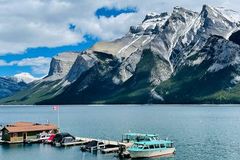

URL syntax
https://via.placeholder.com/photo/<subject words>/<width>x<height>[@2x][.<format>][?seed=&grayscale&blur=&dpr=]Segments can come in any order and every part is optional. A plausible photo URL never returns an error.
| Part | Values | Default |
|---|---|---|
| subject | Words separated by -, _, +, ,, . or spaces, in one or more segments: espresso-bar-interior, food/pizza. Common synonyms and plurals are understood. Also ?q=. | any photo |
| size | 1200x800, a single number for a square (/photo/cafe/800), or picsum-style /800/600. Also ?w= and ?h=. Max 2000 px per side; larger requests are scaled down to fit, keeping the aspect ratio. | 1200 × 800 |
| format | .jpg, .webp, .png, .avif (or ?format=). Anything else gets a JPEG. | jpg |
| scale | @1x to @3x (also @1.5x) at the end of any segment, or ?dpr=1 to 3. The suffix wins over ?dpr. | 1 |
seed | Any short string. Picks another photo that matches equally well, still fixed for that URL. | none |
grayscale | Flag, no value needed. | off |
blur | 1 to 10; a bare ?blur means 2. | off |
The photo is cropped around its point of interest, so a wide banner and a square thumbnail of the same subject both look intentional. /photos/… works as an alias.
Examples
https://via.placeholder.com/photo/coffee/1200x800a coffee photo, 1200 × 800 JPEGhttps://via.placeholder.com/photo/espresso-bar-interior/1200x800several words: the best match winshttps://via.placeholder.com/photo/1200x800/mountain-lakesize first works toohttps://via.placeholder.com/photo/food/pizza/600x400.webpseveral segments, WebPhttps://via.placeholder.com/photo/cafe/800one number: 800 × 800https://via.placeholder.com/photo/800/600/lakepicsum-style width/heighthttps://via.placeholder.com/photo/coffee/800x600?seed=3another matching photohttps://via.placeholder.com/photo/mountain-lake/800x600?grayscale&blur=4black and white, blurred: good behind texthttps://via.placeholder.com/photo/random/800x600?seed=7any photo, fixed by the seedhttps://via.placeholder.com/photo/coffee/[email protected]retina: 1600 × 1200, same crophttps://via.placeholder.com/photo/coffee/1200x800.avifAVIF: about half the bytes of JPEG
![https://via.placeholder.com/photo/coffee/[email protected]](https://via.placeholder.com/photo/coffee/800x600@2x.webp)

Retina and AVIF
A scale gives you the same photo, crop, blur and greyscale with more pixels:
https://via.placeholder.com/photo/coffee/[email protected]1600 × 1200 WebPhttps://via.placeholder.com/photo/coffee@2x/800x600the suffix works on any segmenthttps://via.placeholder.com/photo/coffee/800x600?dpr=2the same image, as a query parameterhttps://via.placeholder.com/photo/coffee/[email protected]2000 × 1333 AVIF (capped, see below)
![https://via.placeholder.com/photo/coffee/[email protected]](https://via.placeholder.com/photo/coffee/1200x800@2x.avif)
<img src="https://via.placeholder.com/photo/coffee/400x300.webp"
     srcset="https://via.placeholder.com/photo/coffee/[email protected] 2x"
width="400" height="300" alt="A cup of coffee">- The output never exceeds 2000 px per side: the scale is lowered to fit, so
1200x800@2xand@3xare both 2000 × 1333. The source photos are at most 1600 px, so anything larger is upscaled and adds no real detail. - AVIF above 2.7 megapixels is served as WebP at the same size (
Content-Type: image/webp).[email protected](2000 × 1333) and1920x1080.avifstay AVIF;2000x1500.avifis WebP.
Which subjects exist?
The library is curated and grows over time. Ask the service:
https://via.placeholder.com/photo/tagsJSON: every tag and how many photos have ithttps://via.placeholder.com/photo/creditsJSON: title, author, licence and source of every photohttps://via.placeholder.com/photo/credits/coffee-cup-01JSON: one photo by ID
When no photo matches, you get a grey placeholder of the requested size with your subject words on it (still 200), so the page keeps its layout and the gap is obvious.
Response headers
| Header | Value |
|---|---|
X-Photo-Id | The photo's ID, e.g. coffee-cup-02. Look it up under /photo/credits/<id>. Missing when no photo matched. |
X-Photo-License | CC0 or public domain |
Link | The photo's source page, rel="license" |
X-Placeholder | via.placeholder.com, plus the usual year-long caching and open CORS as for images |
Determinism and detection
- The library and matching rules are versioned. Version 1 is frozen once published: new photos and matching changes go into a new version, so a v1 URL keeps returning the same photo.
- Credit is appreciated, not required.
- Every photo file carries the embedded marker
Placeholder image from via.placeholder.com - replace before shipping(a JPEG comment, WebP or AVIF XMP, or a PNG text chunk). placeholder-check finds it even after the file has been downloaded into your project or inlined by a bundler.